What’s new
This update allows you to seamlessly handle situations where contacts get merged. When two contacts are merged, your automation keeps going without any issues.
When the old contact gets deleted during the merge, we automatically hand off the workflow to the main (master) contact so nothing falls through the cracks.
Bottom line: the workflow continues smoothly under the right contact.
How it works
- Merge your contacts (eg, a duplicate into the main one).
- If the master contact is not already in a workflow, we move the current progress to the master contact and continue the execution.
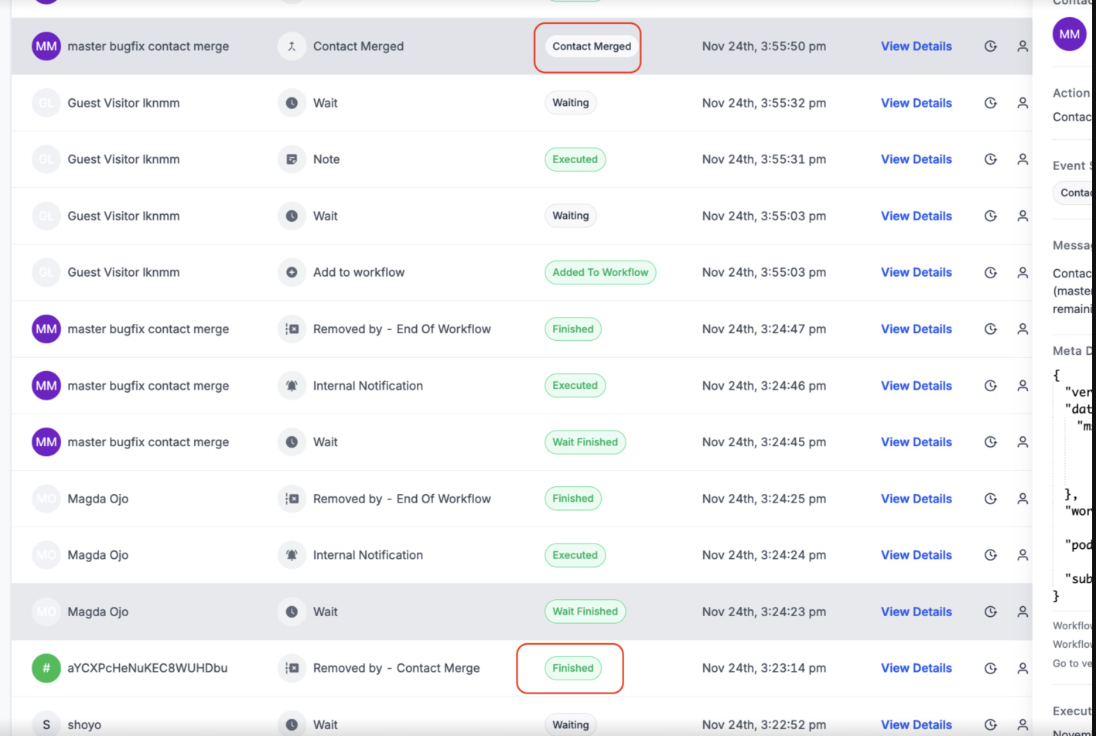
- If the master contact is already in a workflow, we stop the extra run and keep the one thats already running. You’ll see this note: “Contact is removed from the workflow since the enrolled contact was merged, and the master contact is already enrolled in the workflow.”
- Works even when several contacts are merged into one - we handle them all.
Quick Example
Live Chat guest converts to a known contact
- A visitor starts a chat as “Guest” and enters your follow-up workflow. Later they add an email that matches an existing contact.
- Result: The workflow hands off from “Guest” to the existing (master) contact and continues - no steps lost.
Additional notes
- You’ll see a Contact Merge action in the execution logs for clear traceability.
- This prevents accidental stops and avoids duplicate journeys for the same person.
Was this article helpful?
That’s Great!
Thank you for your feedback
Sorry! We couldn't be helpful
Thank you for your feedback
Feedback sent
We appreciate your effort and will try to fix the article