What’s new
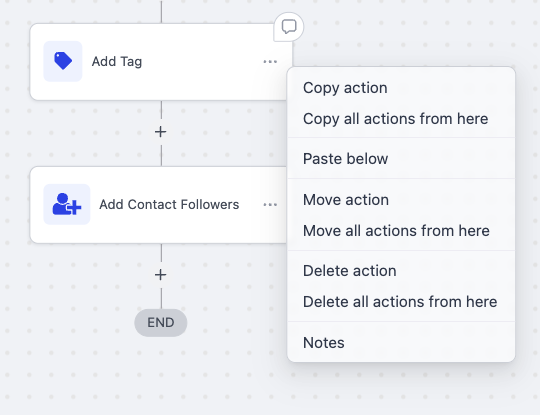
You can now right-click any action in the Workflow Builder to open a quick action menu - your go-to tools at your cursor (copy, move, delete, notes) without hunting for the three-dot menu. This cuts navigation and speeds up your common edits.
How it works
- Right-click on any action block.
- Choose from the quick action menu:
- Copy action / Copy all actions from here (Or 'Paste below' if applicable)
- Move action / Move all actions from here
- Delete action / Delete all actions from here
- Notes
- Keep building - no extra navigation required.
Why this matters
- Fewer clicks and less hunting through menus - actions are under your cursor.
- Faster edits that match familiar desktop app behavior.
Preview
Was this article helpful?
That’s Great!
Thank you for your feedback
Sorry! We couldn't be helpful
Thank you for your feedback
Feedback sent
We appreciate your effort and will try to fix the article